Are you wondering whether the free DriveHub plugin is enough for your website, or whether you need DriveHub Pro? You’re in the right place.
The short answer: Free displays your files. Pro lets people act on them. The free plugin connects your Google Drive, manages your files from WordPress and shows them on your pages as galleries, lists and embedded documents. Pro adds the modules and tools where visitors do something: upload, browse, search, play, approve, and much more.
Here is an easy guide to see the difference for yourself, plus a full feature table.
Step 1: Open the Free vs Pro Tab #
DriveHub has its own comparison built in:
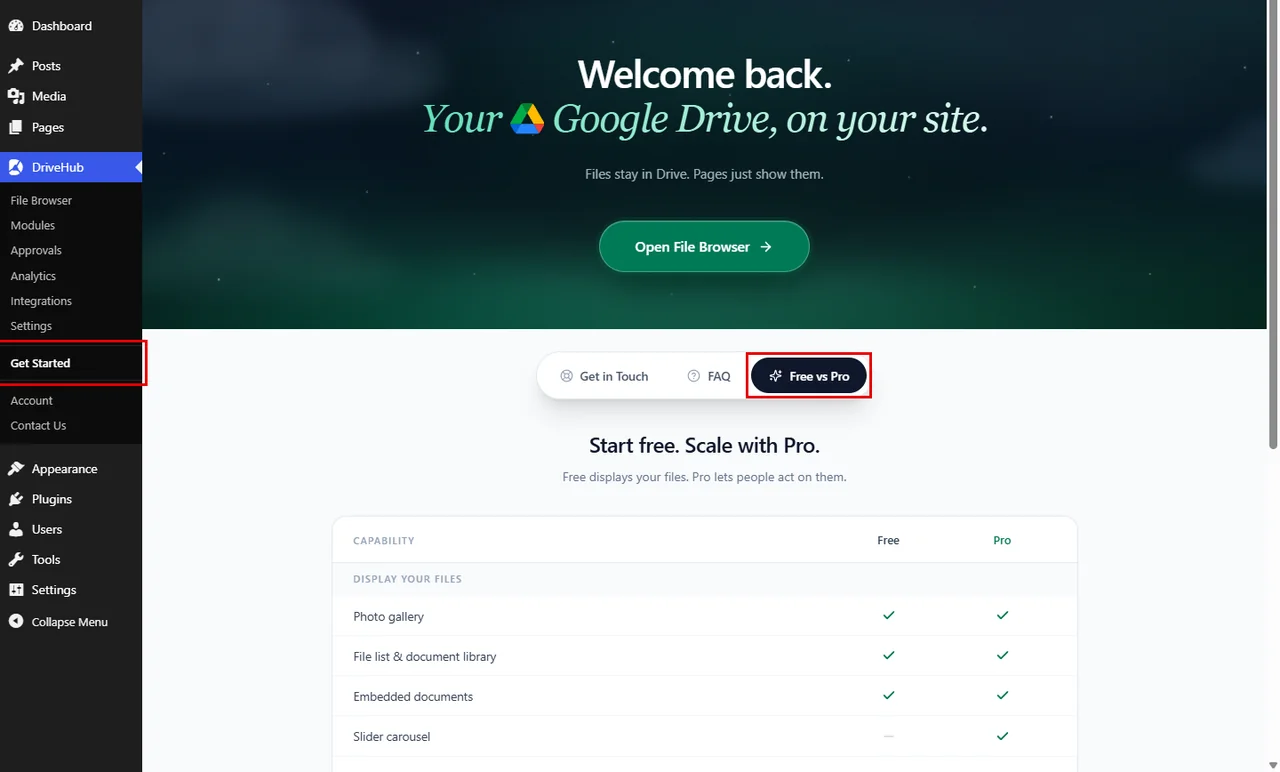
- Go to DriveHub > Get Started from your WP-Admin.
- Click on the Free vs Pro tab below the welcome banner.
Step 2: Read the Comparison #
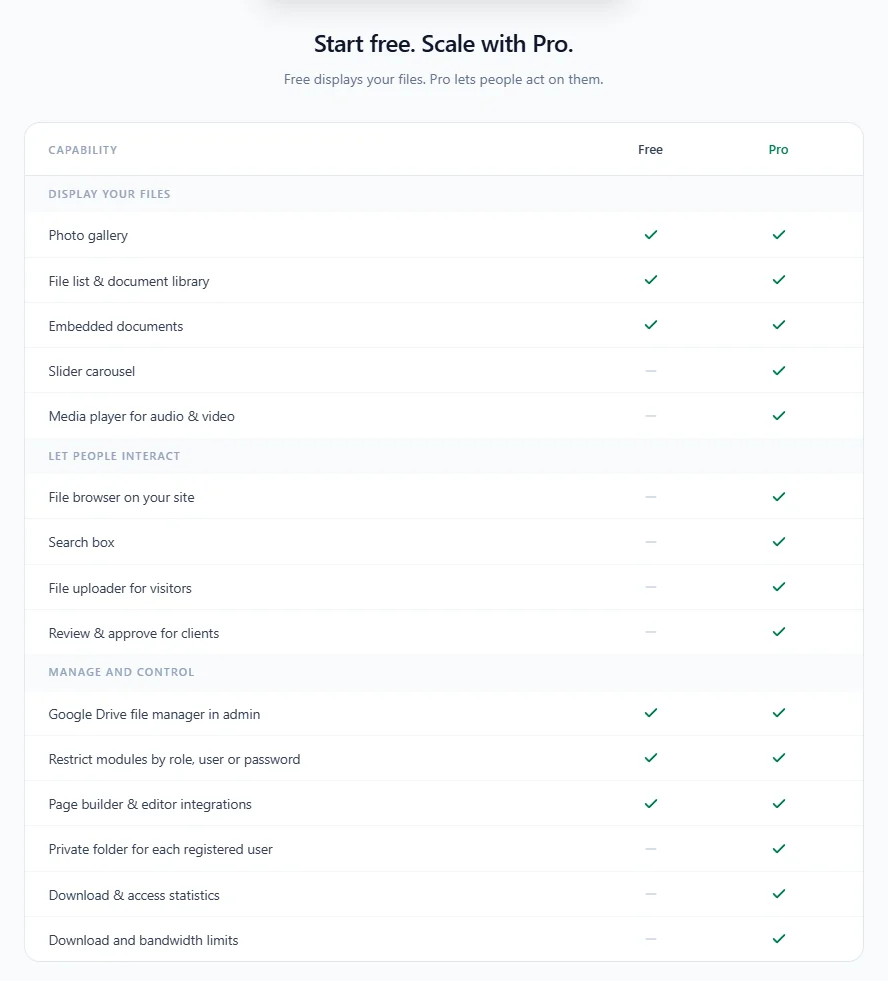
The tab opens with Start free. Scale with Pro. and a table in three groups: Display your files, Let people interact and Manage and control. A green tick means the feature is included; a grey dash means it is not.
Step 3: See Which Module Types Are Pro #
The clearest difference is in the modules you can build:
- Go to DriveHub > Modules and click on Add module.
- The Select module type window lists all nine module types.
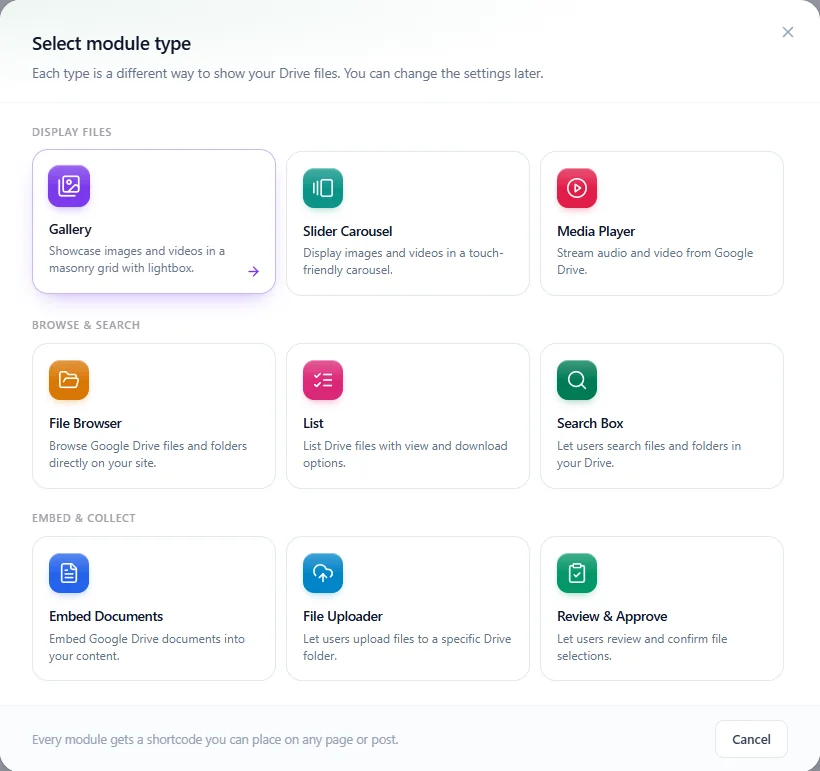
Gallery, List and Embed Documents are free. Slider Carousel, Media Player, File Browser, Search Box, File Uploader and Review & Approve need Pro. With Pro active, you can pick any of them.
Step 4: See Which Integrations Are Pro #
The same goes for the plugins DriveHub works with:
- Go to DriveHub > Integrations.
- Scroll to Form uploads. Contact Form 7 works with the free plugin; the other seven form plugins need Pro.
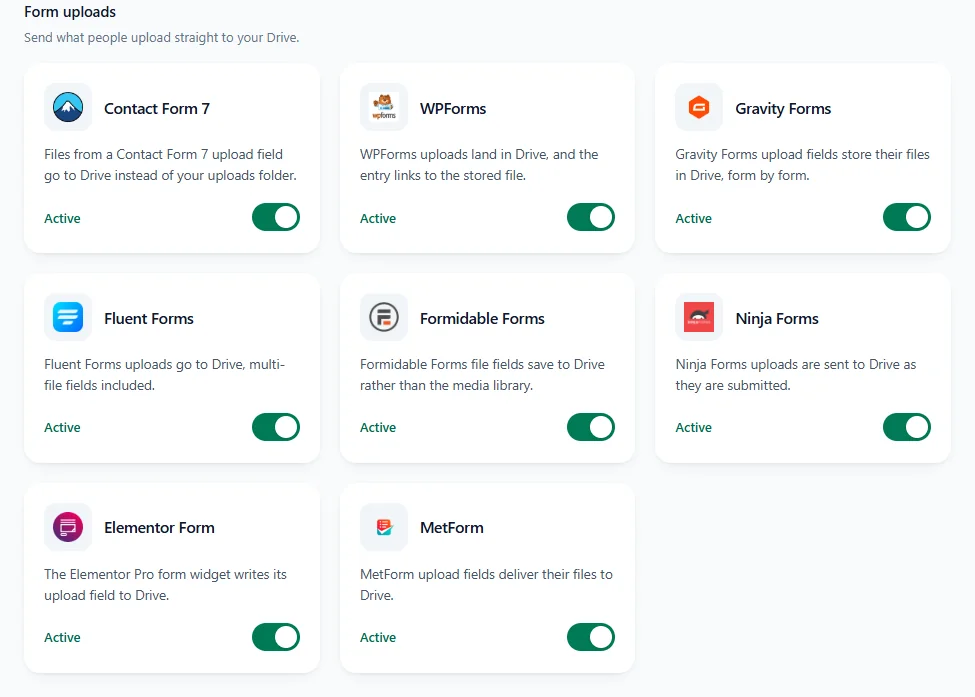
With Pro active, every integration has its own on and off switch, so you turn on only the plugins you use.
DriveHub Free and Pro Feature by Feature #
Here is everything in one place. Each feature links to its guide.
Connect and manage #
| Feature | Free | Pro |
|---|---|---|
| Connect Google Drive with Whole Drive or Selected folders (guide) | Yes | Yes |
| Connect more than one Google account (guide) | Yes | Yes |
| Manage Drive files in the WordPress dashboard (File Browser) (guide) | Yes | Yes |
| Direct preview and download links (guide) | Yes | Yes |
| Export, import and reset settings (Tools) (guide) | Yes | Yes |
Modules #
| Module | Free | Pro |
|---|---|---|
| Gallery (guide) | Yes | Yes |
| List (guide) | Yes | Yes |
| Embed Documents (guide) | Yes | Yes |
| File Browser (guide) | No | Yes |
| File Uploader (guide) | No | Yes |
| Media Player (guide) | No | Yes |
| Slider Carousel (guide) | No | Yes |
| Search Box (guide) | No | Yes |
| Review & Approve (guide) | No | Yes |
| Password protect a module (guide) | Yes | Yes |
| Choose who can see a module by role or user (guide) | Yes | Yes |
Editors and integrations #
| Integration | Free | Pro |
|---|---|---|
| Block editor, Classic Editor, Elementor and Divi (Block editor guide, Classic Editor guide, Divi guide) | Yes | Yes |
| Contact Form 7 uploads to Google Drive | Yes | Yes |
| WPForms, Gravity Forms, Fluent Forms, Formidable Forms, Ninja Forms, Elementor Form and MetForm uploads (Gravity Forms guide, Elementor Form guide) | No | Yes |
| Media Library (guide) | No | Yes |
| Advanced Custom Fields (guide) | No | Yes |
| WooCommerce (guide) | No | Yes |
| Easy Digital Downloads (guide) | No | Yes |
| Dokan (guide) | No | Yes |
| Tutor LMS (guide) | No | Yes |
Pro screens and settings #
| Feature | Free | Pro |
|---|---|---|
| Private Folders: a Google Drive folder for each registered user (guide) | No | Yes |
| Approvals screen for client proofing (guide) | No | Yes |
| Analytics screen and email reports (guide) | No | Yes |
| Usage Limit: download and bandwidth limits (guide) | No | Yes |
| Synchronization: auto sync with Google Drive (guide) | No | Yes |
| Appearance: preloader styles | Some | All |
| Appearance: theme colour and Custom CSS (guide) | No | Yes |
| User Access: who can use each DriveHub screen (guide) | Yes | Yes |
| User Access: Members’ Files tab, Analytics Page and limiting users to Select Folders | No | Yes |
| Security: domain, sharing and login screen options (guide) | Yes | Yes |
| Security: Secure Video Playback | No | Yes |
| Performance: Lazy Module Loading, Files per Load and Server Throttle (guide) | No | Yes |
| Advanced: Media Preview Mode (guide) | No | Yes |
Note: In the free plugin, every Pro setting is still visible and marked as Pro, so you always know what is there.
Which One Do You Need? #
- Free is enough if you want to show photos, lists of files or documents from Google Drive on your pages, and manage your Drive from WordPress.
- Choose Pro if you want visitors to upload, browse, search or approve files, if you sell files with WooCommerce or Easy Digital Downloads, if your forms (other than Contact Form 7) should send files to Drive, or if you need private folders, analytics and limits.
Ready to upgrade? Follow How to Install and Activate DriveHub Pro. Everything you build with the free plugin keeps working when you add Pro.


